Overview
Great cameras, expensive lenses, and powerful editing software can certainly improve your videos—but they don't automatically make you a better editor.
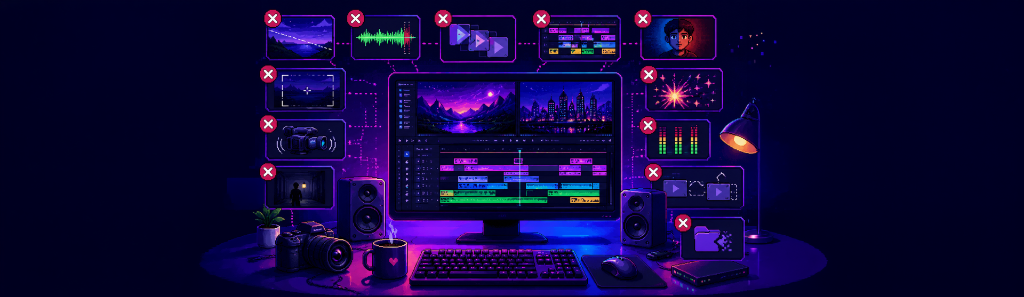
In reality, most videos feel unprofessional because of small editing mistakes that slowly add up. Poor pacing, inconsistent audio, messy timelines, awkward transitions, and unclear storytelling are often far more noticeable than a lack of expensive equipment.
The good news is that these mistakes are easy to fix once you know what to look for.
Whether you're creating YouTube videos, documentaries, tutorials, product demonstrations, podcasts, or social media content, avoiding these common editing mistakes will instantly make your videos feel more polished.
1. Prioritizing Visuals Over Storytelling
Many new editors spend hours perfecting transitions, animations, and visual effects before making sure the story actually works.
Professional editors do the opposite.
Before adding effects, ask yourself:
- Does the story make sense?
- Is the pacing natural?
- Does every scene serve a purpose?
A simple edit with a compelling narrative will always outperform a flashy edit with no direction.
2. Using Too Many Transitions
Every transition should have a reason.
Beginners often fill their timeline with zooms, spins, wipes, flashes, and dozens of other transition effects.
The result?
A distracting viewing experience.
Simple cuts are often the most effective transition.
Professional editors use transitions sparingly so they enhance the story instead of becoming the story.
3. Ignoring Audio Quality
Poor audio is one of the fastest ways to lose an audience.
Even stunning visuals can't compensate for:
- Background noise
- Uneven volume
- Distorted narration
- Echo
- Poor microphone quality
Viewers are surprisingly forgiving of average visuals.
They are much less forgiving of poor sound.
4. Editing Without a Plan
Jumping directly into editing without organizing footage usually leads to confusion.
Before making your first cut:
- Create folders
- Organize bins
- Rename important clips
- Separate audio and graphics
Five minutes of organization can save hours later.
5. Cutting Too Quickly
Fast editing works for some videos.
Not all videos.
Many beginners remove every pause, creating videos that feel rushed and exhausting.
Good pacing gives viewers time to absorb information.
Sometimes slowing down creates a much stronger emotional impact.
6. Overusing Motion Graphics
Motion graphics are powerful.
Too many become distracting.
Ask yourself:
"Does this animation help the viewer understand something?"
If the answer is no, consider removing it.
Good design often goes unnoticed.
7. Inconsistent Color Correction
One clip feels warm.
The next feels blue.
Another is overexposed.
Color inconsistency immediately makes videos feel amateur.
Take time to match your shots before applying creative color grades.
8. Forgetting About Music Levels
Background music should support narration—not compete with it.
If viewers struggle to understand your voiceover because the music is too loud, the edit needs adjusting.
Professional editors constantly balance dialogue, music, and sound effects.
9. Making Every Cut Perfect
Many editors spend ten minutes adjusting a cut by two frames.
Perfectionism often slows projects more than it improves them.
Focus on the overall story first.
Small refinements can always come later.
10. Working on a Messy Timeline
An unorganized timeline makes revisions difficult.
Professional editors separate:
- Dialogue
- Music
- Voiceovers
- Sound effects
- Graphics
- Adjustment layers
A clean timeline is easier to understand months later.
11. Never Taking a Break
After watching the same timeline fifty times, your brain stops noticing mistakes.
Take a short break.
Come back with fresh eyes.
You'll almost always notice:
- Awkward pauses
- Typographical errors
- Poor transitions
- Audio inconsistencies
Fresh perspective is one of the simplest quality-control tools available.
12. Breaking Your Creative Flow
One mistake rarely discussed is constantly interrupting your editing process.
Many editors repeatedly leave Premiere Pro to:
- Generate voiceovers
- Download assets
- Rename files
- Search folders
- Open browser tabs
Each interruption forces your brain to refocus when you return.
The more often this happens, the slower your editing becomes.
Professional workflows aim to keep everything in one place whenever possible.
Small Improvements Create Big Results
Professional editing isn't about avoiding one huge mistake.
It's about avoiding dozens of small ones.
Every cleaner cut.
Every organized folder.
Every balanced audio track.
Every thoughtful transition.
Together, these details create videos that feel polished and intentional.
Great editing is often invisible—the audience simply enjoys the experience without noticing the work behind it.
Keep Your Voiceover Workflow Inside Premiere Pro
One of the most common interruptions during editing is generating voiceovers.
A typical workflow requires switching to a browser, using an online text-to-speech tool, downloading the audio, importing it into Premiere Pro, and repeating the process every time the script changes.
The Vampro Voice Generator for Adobe Premiere Pro removes that friction by allowing you to generate AI voiceovers directly inside Premiere Pro.
You can write your script, choose a voice, adjust the tone, speed, and pitch, and generate narration without leaving your editing workspace.
By keeping voice creation inside your timeline, Vampro helps you maintain creative momentum, respond to revisions faster, and spend more time crafting great videos instead of managing repetitive tasks.
The fewer interruptions you have during editing, the easier it becomes to stay focused on what truly matters—telling a compelling story.